06. Know When The DOM Is Ready
L3 59 HS - What You'Ll Learn
The DOM Is Built Incrementally
Do you remember the video we watched of Illya from Google explaining how the DOM is parsed? A key thing to point out is that when the HTML is received and converted into tokens and built into the document object model, is that this is a sequential process. When the parser gets to a <script> tag, it must wait to download the script file and execute that JavaScript code. This is the important part and the key to why the placement of the JavaScript file matters!
Let's look at some code to show (more or less) what's happening. Take a look at this initial part of an HTML file:
<!DOCTYPE html>
<html lang="en">
<head>
  <link rel="stylesheet" href="/css/styles.css" />
  <script>
    document.querySelector('footer').style.backgroundColor = 'purple';
  </script>
This isn't the full HTML file…BUT, it's all that's been parsed so far. Notice at the bottom of the code that we have so far is a <script> file. This is using inline JavaScript rather than pointing to an external file. The inline file will execute faster because the browser doesn't have to make another network request to fetch the JavaScript file. But the outcome will be exactly the same for both this inline version and if the HTML had linked to an external JavaScript file.
Do you see the JavaScript/DOM code in the <script> tags? Take a second and read it again:
document.querySelector('footer').style.backgroundColor = 'purple';Does anything jump out at you about this code? Anything at all? This code is completely error-free…unfortunately, when it runs, it will still cause an error. Any ideas why?
The problem is with the .querySelector() method. When it runs…there's no <footer> element to select from the constructed document object model yet! So instead of returning a DOM element, it will return null. This causes an error because it would be like running the following code:
null.style.backgroundColor = 'purple';null doesn't have a .style property, so thus our error is born.
Now, we've already used one solution to this issue. Remember that we moved the JavaScript file down to the bottom of the page. Think about why this would make things work. Well, if the DOM is built sequentially, if the JavaScript code is moved to the very bottom of the page, then by the time the JavaScript code is run, all DOM elements will already exist!
However, an alternative solution would be to use browser events! 🙌🏼
The Content Is Loaded Event
When the document object model has been fully loaded, the browser will fire an event. This event is called the DOMContentLoaded event, and we can listen for it the same way we listen to any other events:
document.addEventListener('DOMContentLoaded', function () {
    console.log('the DOM is ready to be interacted with!');
});
DOM L3 65 - DOM Contnet Load
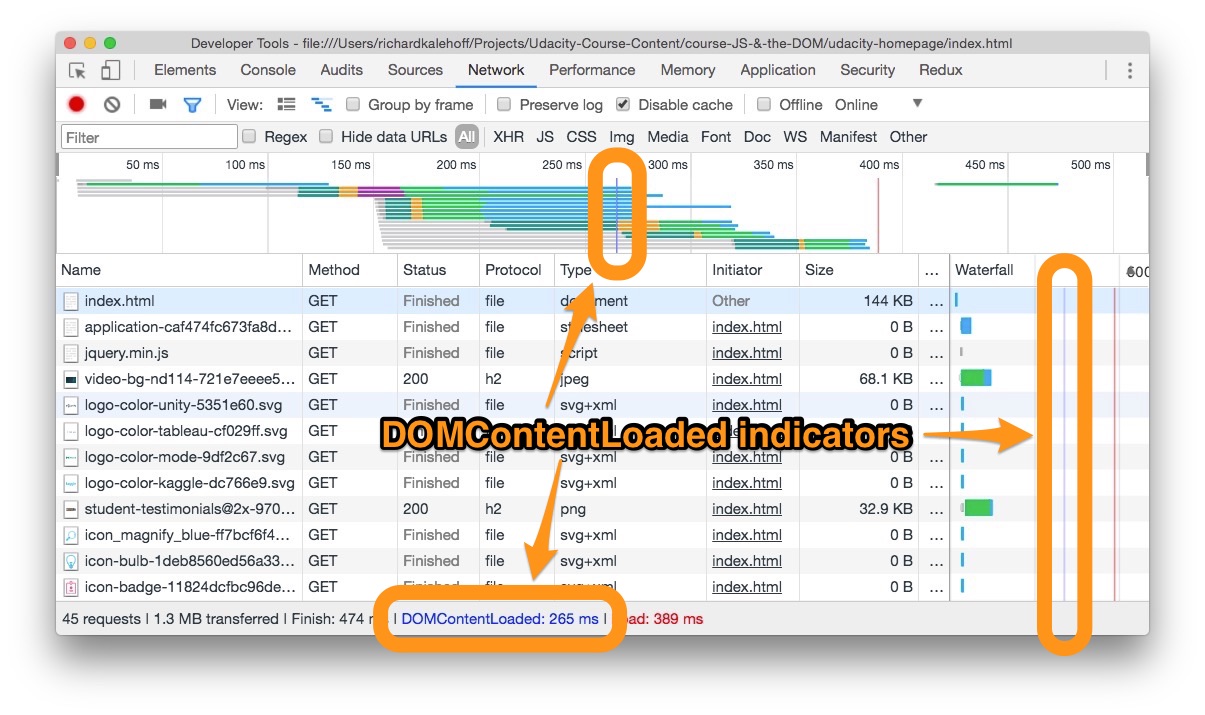
The Network pane of DevTools with the DOMContentLoaded indicators highlighted.
SOLUTION:
- the `document` object
Using the DOMContentLoaded Event
Because we now know about the DOMContentLoaded event, we can use it to keep our JS code in the <head>.
Let's update the previous HTML code to include this event:
<!DOCTYPE html>
<html lang="en">
<head>
    <link rel="stylesheet" href="/css/styles.css" />
    <script>
      document.addEventListener('DOMContentLoaded', function () {
          document.querySelector('footer').style.backgroundColor = 'purple';
      });
    </script>
Pretty cool, right?!? We have the JavaScript code in the <head> element, but it is now wrapped in an event listener for the DOMContentLoaded event. This will prevent the DOM-styling code from running when the browser gets to it. Then, when the DOM has been constructed, the event will fire and this code will run.
If you're looking at somebody else's code, you may see that their code listens for the load event being used instead (e.g. document.onload(...)). load fires later than DOMContentLoaded -- load waits until all of the images, stylesheets, etc. have been loaded (everything referenced by the HTML.) Many older developers use load in place of DOMContentLoaded as the latter wasn't supported by the very earliest browsers. But if you need to detect when your code can run, DOMContentLoaded is generally the better choice.
However, just because you can use the DOMContentLoaded event to write JavaScript code in the <head> that doesn't mean you should do this. Doing it this way, we have to write more code (all of the event listening stuff) and more code is usually not always the best way to do something. Instead, it would be better to move the code to the bottom of the HTML file just before the closing </body> tag.
So when would you want to use this technique? Well, JavaScript code in the <head> will run before JavaScript code in the <body>, so if you do have JavaScript code that needs to run as soon as possible, then you could put that code in the <head> and wrap it in a DOMContentLoaded event listener. This way it will run as early as possible, but not too early that the DOM isn't ready for it.
Recap
In this section, we learned about the helpful DOMContentLoaded event.
Along the way, we reviewed how the HTML code is parsed incrementally and how this affects JavaScript/DOM code. We also looked at why writing DOM-manipulation code in the <head> can cause errors.